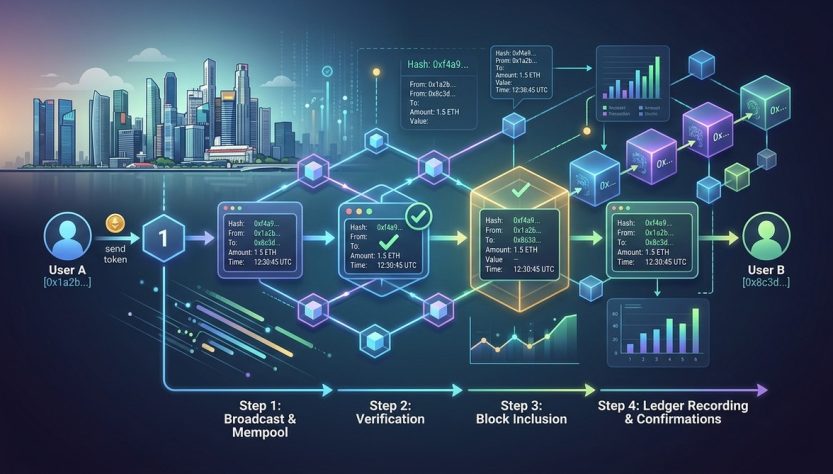
If you have ever sent or received crypto and stared at a block explorer screen full of hex codes and timestamps, you are not alone. That page looks like a foreign language at first. But here is the good news: once you know what each field means, reading a blockchain transaction becomes as natural as checking a bank statement. This walkthrough will show you exactly what to look for, line by line.
Every blockchain transaction has four core parts: a unique hash, inputs (where the funds come from), outputs (where they go), and a status indicator. By learning to spot these four elements on any block explorer, you can verify payments, check fees, and confirm whether a transaction has been permanently recorded on the ledger.
What You See When You Open a Block Explorer
A block explorer is a website that lets anyone view transaction data on a public blockchain. Think of it as a search engine for the ledger. When you paste a transaction ID (also called a TXID or hash) into the search bar, you get a page full of information.
Let us break down the most important fields you will encounter.
The Transaction Hash (TXID)
This is the unique fingerprint of your transaction. It is a long string of letters and numbers, something like 0x3a4e...9f2c. Every transaction on the network gets its own hash. You can share this hash with anyone who wants to verify that a payment was sent. It is not secret. It is public by design.
Status: Confirmed or Pending
The first thing to check is whether the transaction is confirmed. A confirmed transaction has been included in a block and validated by the network. A pending transaction is still waiting in the mempool (the waiting room for unconfirmed transactions). If the status says “unconfirmed” for more than a few hours, the fee might be too low for miners to pick it up.
Block Height and Timestamp
Once confirmed, the explorer shows which block included your transaction. The block height is a number that tells you how many blocks have been mined before this one. A higher block height means the transaction is older and more deeply embedded in the chain. The timestamp shows when the block was produced, not when you hit send.
How to Read Transaction Inputs and Outputs
This is the heart of any transaction. Every blockchain transaction consumes old outputs (the coins you received earlier) and creates new outputs (the coins you send to someone else).
Inputs (Where the Money Comes From)
Each input refers back to a previous transaction’s output. You will see a list of “previous TXID” values and index numbers. This is how the blockchain tracks ownership. If you see multiple inputs, it means the sender combined several smaller amounts to make the payment.
Outputs (Where the Money Goes)
Outputs list the recipient addresses and the amounts sent. A standard transaction has at least two outputs: one for the recipient and one for the change address (unless the amount is exact). The change address often belongs to the sender’s wallet, not to the recipient.
The Fee
The fee is calculated automatically. It is the difference between the total input value and the total output value. Most explorers show this clearly. A higher fee usually means faster confirmation. A very low fee might leave your transaction stuck.
| Field | What It Tells You | Common Mistake |
|---|---|---|
| TXID | Unique identifier for the transaction | Sharing it as if it is a secret password |
| Status | Confirmed or still pending | Assuming pending means failed |
| Inputs | Which previous coins are being spent | Thinking inputs are “from” addresses only |
| Outputs | Recipient addresses and amounts | Forgetting the change output belongs to sender |
| Fee | Network cost paid to miners | Confusing fee with the total amount sent |
A Step-by-Step Walkthrough of a Real Transaction
Let us walk through an example together. Imagine you sent 0.05 BTC to a friend. You open your wallet app, copy the TXID, and paste it into a block explorer.
-
Check the status first. Look for a green checkmark or the word “Confirmed.” If it says “Unconfirmed,” note how many confirmations other transactions in the same block have.
-
Find the total input amount. Add up all the input values. This tells you how much the sender had in their wallet before the transaction.
-
Find the total output amount. Add up all the output values. This tells you how much was sent to the recipient plus any change returned.
-
Subtract outputs from inputs. The difference is the fee. If you see 0.05 BTC as input and 0.049 BTC as output, the fee is 0.001 BTC.
-
Identify the recipient address. The output that matches the amount you intended to send is the recipient. The other output (if any) is change going back to the sender.
Expert advice: Always verify the recipient address character by character. Scammers create addresses that look similar to real ones. A block explorer shows the exact address. Compare it carefully with the one you intended to send to.
Common Mistakes Beginners Make
Even experienced users slip up sometimes. Here are the most frequent errors.
- Confusing the TXID with a wallet address. A TXID identifies a single transaction. A wallet address identifies an account. They look similar but serve completely different purposes.
- Thinking all outputs go to the recipient. Change outputs are common. If you send 1 ETH and your wallet had 1.5 ETH, the extra 0.5 ETH minus fee goes back to you as change.
- Ignoring the fee field. Some explorers hide the fee in a submenu. Always look for it. A fee that is too high can eat into your transfer, and a fee that is too low can delay it indefinitely.
- Believing “confirmed” means irreversible. On most proof-of-work chains, a transaction becomes practically irreversible after several confirmations. But a single confirmation can still be reorganized in rare cases. Wait for at least six confirmations for large amounts.
When to Use a Block Explorer
You do not need to check every transaction you make. But there are times when reading the raw data is helpful.
- You sent money and the recipient says they did not receive it.
- You want to verify that a payment from someone else actually settled.
- You are curious about how much fee you paid compared to the network average.
- You are learning how blockchain works and want to see the mechanics in action.
For a deeper look at how the underlying technology works, you can read about how distributed ledgers actually work in our visual guide for beginners.
How to Spot a Smart Contract Transaction
Not all transactions are simple sends. Many involve smart contracts. On Ethereum and similar chains, a transaction might call a function on a contract rather than just moving coins. The block explorer will show a “To” address that belongs to a contract, not a person. You will also see input data (hex code) that represents the function call.
If you see a contract address, the transaction is probably doing something more complex, like swapping tokens on a decentralized exchange or minting an NFT. The explorer might decode the function name for you. If it does not, you can look up the contract on a service like Etherscan.
Reading Transaction Status Across Different Blockchains
The basic structure is similar on Bitcoin, Ethereum, Solana, and others. But there are small differences.
- Bitcoin uses UTXOs (unspent transaction outputs). Inputs and outputs are explicit.
- Ethereum uses an account-based model. The “from” address is the sender, and the “to” address is the recipient or contract.
- Solana uses a different fee model and often shows additional fields like “recent blockhash.”
No matter which chain you use, the four elements (hash, inputs, outputs, status) remain the same. If you want to understand the broader picture of how these systems differ, check out our comparison of public vs private blockchains.
Putting It All Together
Here is a checklist you can use every time you open a block explorer.
- Locate the TXID and copy it for your records.
- Confirm the status is “Confirmed” and note the number of confirmations.
- Verify the recipient address matches exactly.
- Check the fee and decide if it was reasonable.
- Look for any change outputs that belong to you.
If you follow these steps, you will never be confused by a block explorer again.
Your Turn to Read a Transaction
Pick any transaction from your wallet history. Open a block explorer for that chain. Walk through the fields one by one. Write down the TXID, the status, the inputs, the outputs, and the fee. Compare your notes with what you expected. If something looks off, you now have the skills to investigate.
Reading a blockchain transaction is not magic. It is just a structured set of data. Once you learn the layout, you can verify any payment, understand any fee, and feel confident that you are in control of your own on-chain activity.